
Realtek HD Audio Codec Driver — официальная версия драйверов для всех HD Audio кодеков от компании Realtek для корректного воспроизведения аудиофайлов на стационарном компьютере, ноутбуке и других устройствах.
Набор поддерживает большое количество звуковых устройств и материнских плат. Поддерживаются чипы ALC880, ALC882, ALC883, ALC885, ALC888, ALC861, ALC861VD, ALC660, ALC260, ALC262, ALC268, используемые в последних материнских платах. Содержит встроенные утилиты для настройки выходных звуковых сигналов.
Полноценная поддержка новых форматов звука, высокая частота пропускания, поддержка подключения аудио-устройств по технологии Plug and Play, точное распознавание речи и ее ввод.
Возможности:
- Управление уровнем громкости динамиков. Поддержка звуковых устройств.
- Совместим со следующими моделями звуковых карт: ALC883, ALC882, ALC880, ALC861VD, ALC660, ALC260 и другие.
- Поддержка материнских плат Intel® D2500CC — Intel ® 2700DC, Intel® DB65AL, Intel® DH61KVCH, Intel® DH77DF, Intel® DH77KC и многих других.
- Запись звука с любых аудиоустройств, подключенных по технологии Plag And Play.
- Совместимость с Direct Sound 3D для работы со звуками.
- Регулировка громкости звука.
- Изменение конфигурации динамиков.
- Поддержка звуковых эффектов.
- Поддержка 12-полосного эквалайзера. Можно регулировать высоту звука.
- Высокая частота пропускания.
- Установка частоты дискретизации.
- Поддержка функций по распознаванию речи.
- Поддержка WDM-драйвера, утилиты Realtek Soundman и Realtek Sound Effect Manager.
ТОП-сегодня раздела «Программы для драйверов»
Отзывы о программе Realtek HD Audio Codec Driver
Надя Ш. про Realtek HD Audio Codec Driver R2.83 [07-09-2025]
у меня он был на неутбуке на авто, я случайно удалила и не могу установить заново 🙁
8 | 28 | Ответить
Константин про Realtek HD Audio Codec Driver R2.83 [20-07-2025]
Поставил драйвер в итоге пропал звук а на сайте реалтек новые дрова скачиваются по несколько килобайт в секунду(сам файл 500мб) пошло все на***
15 | 11 | Ответить
Мучение про Realtek HD Audio Codec Driver R2.83 [19-02-2025]
Драйвер созданный нелюдями, вечно лагающий
1 | 10 | Ответить
ответьте про Realtek HD Audio Codec Driver R2.83 [28-12-2024]
во время установки драйвера выскакивает ошибка с кодом -0001 помогите
99 | 222 | Ответить
Вася в ответ ответьте про Realtek HD Audio Codec Driver R2.83 [01-06-2025]
Значит чип не поддерживает
| 15 | Ответить
Slava в ответ ответьте про Realtek HD Audio Codec Driver R2.83 [14-06-2025]
чтобы этой ошибки небыло скачайте версию 6.0.9273.1 WHQL (Unofficial) x64 (WIn10+) ищите драйвер с пометкой (Unofficial) (встанет на все материнки)
8 | 10 | Ответить
Олег про Realtek HD Audio Codec Driver R2.83 [10-06-2024]
Нормальные дрова это 281, потом админы увлеклись кокаином или ещё чем(предположение)
30 | 47 | Ответить
«high definition audio driver windows 11»
Your search resulted in over 1000 matching updates. Only the first 1000 are returned. To narrow your search, try adding additional keywords to your search terms.
|
Updates: |
Previous Next
|
| Title | Products | Classification | Last Updated | Version | Size |
Download |
|
|---|---|---|---|---|---|---|---|
|
Realtek Semiconductor Corp. Driver Update (6.0.9924.1) |
Windows 11 Client, version 24H2 and later, Servicing Drivers, Windows 11 Client, version 24H2 and later, Upgrade & Servicing Drivers | Drivers (Sound) | 12/8/2025 | 6.0.9924.1 |
13.1 MB 13710961 |
||
|
Realtek Semiconductor Corp. Driver Update (6.0.9924.1) |
Windows 11 Client, version 25H2 and later, Servicing Drivers, Windows 11 Client, version 25H2 and later, Upgrade & Servicing Drivers | Drivers (Sound) | 12/8/2025 | 6.0.9924.1 |
13.1 MB 13710961 |
||
|
Realtek Semiconductor Corp. Driver Update (6.0.9921.1) |
Windows 11 Client, version 25H2 and later, Servicing Drivers, Windows 11 Client, version 25H2 and later, Upgrade & Servicing Drivers, Windows 11 Client S, version 25H2 and later, Servicing Drivers, Windows 11 Client S, version 25H2 and later, Upgrade & Servicing Drivers | Drivers (Sound) | 12/1/2025 | 6.0.9921.1 |
13.1 MB 13709991 |
||
|
Realtek Semiconductor Corp. Driver Update (6.0.9921.1) |
Windows 11 Client, version 22H2 and later, Servicing Drivers, Windows 11 Client, version 22H2 and later, Upgrade & Servicing Drivers | Drivers (Sound) | 12/1/2025 | 6.0.9921.1 |
13.1 MB 13709991 |
||
|
Realtek Semiconductor Corp. Driver Update (6.0.9921.1) |
Windows 11 Client, version 24H2 and later, Servicing Drivers, Windows 11 Client, version 24H2 and later, Upgrade & Servicing Drivers, Windows 11 Client S, version 24H2 and later, Servicing Drivers, Windows 11 Client S, version 24H2 and later, Upgrade & Servicing Drivers | Drivers (Sound) | 12/1/2025 | 6.0.9921.1 |
13.1 MB 13709991 |
||
|
Realtek Semiconductor Corp. Driver Update (6.0.9921.1) |
Windows 11 Client, version 24H2 and later, Servicing Drivers, Windows 11 Client, version 24H2 and later, Upgrade & Servicing Drivers | Drivers (Sound) | 12/1/2025 | 6.0.9921.1 |
13.1 MB 13709991 |
||
|
Realtek Semiconductor Corp. Driver Update (6.0.9918.1) |
Windows 11 Client, version 22H2 and later, Servicing Drivers, Windows 11 Client, version 22H2 and later, Upgrade & Servicing Drivers | Drivers (Sound) | 11/24/2025 | 6.0.9918.1 |
12.4 MB 13021668 |
||
|
Realtek Semiconductor Corp. Driver Update (6.0.9918.1) |
Windows 11 Client, version 24H2 and later, Servicing Drivers, Windows 11 Client, version 24H2 and later, Upgrade & Servicing Drivers | Drivers (Sound) | 11/24/2025 | 6.0.9918.1 |
12.4 MB 13004570 |
||
|
Realtek Semiconductor Corp. Driver Update (6.0.9918.1) |
Windows 11 Client, version 25H2 and later, Servicing Drivers, Windows 11 Client, version 25H2 and later, Upgrade & Servicing Drivers | Drivers (Sound) | 11/24/2025 | 6.0.9918.1 |
13.1 MB 13696213 |
||
|
Realtek Semiconductor Corp. Driver Update (6.0.9918.1) |
Windows 11 Client, version 24H2 and later, Servicing Drivers, Windows 11 Client, version 24H2 and later, Upgrade & Servicing Drivers | Drivers (Sound) | 11/24/2025 | 6.0.9918.1 |
12.4 MB 13021668 |
||
|
Realtek Semiconductor Corp. Driver Update (6.0.9918.1) |
Windows 11 Client, version 25H2 and later, Servicing Drivers, Windows 11 Client, version 25H2 and later, Upgrade & Servicing Drivers | Drivers (Sound) | 11/24/2025 | 6.0.9918.1 |
12.4 MB 13004570 |
||
|
Realtek Semiconductor Corp. Driver Update (6.0.9918.1) |
Windows 11 Client, version 22H2 and later, Servicing Drivers, Windows 11 Client, version 22H2 and later, Upgrade & Servicing Drivers | Drivers (Sound) | 11/24/2025 | 6.0.9918.1 |
12.4 MB 13004570 |
||
|
Realtek Semiconductor Corp. Driver Update (6.0.9918.1) |
Windows 11 Client, version 25H2 and later, Servicing Drivers, Windows 11 Client, version 25H2 and later, Upgrade & Servicing Drivers | Drivers (Sound) | 11/24/2025 | 6.0.9918.1 |
12.6 MB 13173455 |
||
|
Realtek Semiconductor Corp. Driver Update (6.0.9915.1) |
Windows 11 Client, version 24H2 and later, Servicing Drivers, Windows 11 Client, version 24H2 and later, Upgrade & Servicing Drivers, Windows 11 Client S, version 24H2 and later, Servicing Drivers, Windows 11 Client S, version 24H2 and later, Upgrade & Servicing Drivers | Drivers (Sound) | 11/17/2025 | 6.0.9915.1 |
12.2 MB 12828437 |
||
|
Realtek Semiconductor Corp. Driver Update (6.0.9915.1) |
Windows 11 Client, version 24H2 and later, Servicing Drivers, Windows 11 Client, version 24H2 and later, Upgrade & Servicing Drivers, Windows 11 Client S, version 24H2 and later, Servicing Drivers, Windows 11 Client S, version 24H2 and later, Upgrade & Servicing Drivers | Drivers (Sound) | 11/17/2025 | 6.0.9915.1 |
12.4 MB 13016190 |
||
|
Realtek Semiconductor Corp. Driver Update (6.0.9915.1) |
Windows 11 Client, version 25H2 and later, Servicing Drivers, Windows 11 Client, version 25H2 and later, Upgrade & Servicing Drivers, Windows 11 Client S, version 25H2 and later, Servicing Drivers, Windows 11 Client S, version 25H2 and later, Upgrade & Servicing Drivers | Drivers (Sound) | 11/17/2025 | 6.0.9915.1 |
12.4 MB 13016190 |
||
|
Realtek Semiconductor Corp. Driver Update (6.0.9915.1) |
Windows 11 Client, version 25H2 and later, Servicing Drivers, Windows 11 Client, version 25H2 and later, Upgrade & Servicing Drivers, Windows 11 Client S, version 25H2 and later, Servicing Drivers, Windows 11 Client S, version 25H2 and later, Upgrade & Servicing Drivers | Drivers (Sound) | 11/17/2025 | 6.0.9915.1 |
13.1 MB 13691231 |
||
|
Realtek Semiconductor Corp. Driver Update (6.0.9915.1) |
Windows 11 Client, version 24H2 and later, Servicing Drivers, Windows 11 Client, version 24H2 and later, Upgrade & Servicing Drivers, Windows 11 Client S, version 24H2 and later, Servicing Drivers, Windows 11 Client S, version 24H2 and later, Upgrade & Servicing Drivers | Drivers (Sound) | 11/17/2025 | 6.0.9915.1 |
12.4 MB 13016190 |
||
|
Realtek Semiconductor Corp. Driver Update (6.0.9915.1) |
Windows 11 Client, version 25H2 and later, Servicing Drivers, Windows 11 Client, version 25H2 and later, Upgrade & Servicing Drivers | Drivers (Sound) | 11/17/2025 | 6.0.9915.1 |
13.1 MB 13691231 |
||
|
Realtek Semiconductor Corp. Driver Update (6.0.9915.1) |
Windows 11 Client, version 25H2 and later, Servicing Drivers, Windows 11 Client, version 25H2 and later, Upgrade & Servicing Drivers, Windows 11 Client S, version 25H2 and later, Servicing Drivers, Windows 11 Client S, version 25H2 and later, Upgrade & Servicing Drivers | Drivers (Sound) | 11/17/2025 | 6.0.9915.1 |
12.4 MB 13016190 |
||
|
Realtek Semiconductor Corp. Driver Update (6.0.9915.1) |
Windows 11 Client, version 25H2 and later, Servicing Drivers, Windows 11 Client, version 25H2 and later, Upgrade & Servicing Drivers, Windows 11 Client S, version 25H2 and later, Servicing Drivers, Windows 11 Client S, version 25H2 and later, Upgrade & Servicing Drivers | Drivers (Sound) | 11/17/2025 | 6.0.9915.1 |
12.4 MB 13016190 |
||
|
Realtek Semiconductor Corp. Driver Update (6.0.9915.1) |
Windows 11 Client, version 25H2 and later, Servicing Drivers, Windows 11 Client, version 25H2 and later, Upgrade & Servicing Drivers, Windows 11 Client S, version 25H2 and later, Servicing Drivers, Windows 11 Client S, version 25H2 and later, Upgrade & Servicing Drivers | Drivers (Sound) | 11/17/2025 | 6.0.9915.1 |
12.4 MB 13016190 |
||
|
Realtek Semiconductor Corp. Driver Update (6.0.9915.1) |
Windows 11 Client, version 24H2 and later, Servicing Drivers, Windows 11 Client, version 24H2 and later, Upgrade & Servicing Drivers, Windows 11 Client S, version 24H2 and later, Servicing Drivers, Windows 11 Client S, version 24H2 and later, Upgrade & Servicing Drivers | Drivers (Sound) | 11/17/2025 | 6.0.9915.1 |
12.4 MB 13016190 |
||
|
Realtek Semiconductor Corp. Driver Update (6.0.9915.1) |
Windows 11 Client, version 24H2 and later, Servicing Drivers, Windows 11 Client, version 24H2 and later, Upgrade & Servicing Drivers, Windows 11 Client S, version 24H2 and later, Servicing Drivers, Windows 11 Client S, version 24H2 and later, Upgrade & Servicing Drivers | Drivers (Sound) | 11/17/2025 | 6.0.9915.1 |
12.4 MB 13016190 |
||
|
Realtek Semiconductor Corp. Driver Update (6.0.9915.1) |
Windows 11 Client, version 24H2 and later, Servicing Drivers, Windows 11 Client, version 24H2 and later, Upgrade & Servicing Drivers, Windows 11 Client S, version 24H2 and later, Servicing Drivers, Windows 11 Client S, version 24H2 and later, Upgrade & Servicing Drivers | Drivers (Sound) | 11/17/2025 | 6.0.9915.1 |
12.4 MB 13016190 |
Add
Add All
Remove
Remove All
> Настольные ПК и моноблоки
> 500 Series desktops and AIO (ideacentre)
> AIO 520-24IKU All-in-One (ideacentre)
Драйверы и Программное обеспечение
AIO 520-24IKU All-in-One (ideacentre)
Opens in a new window
-
Главная Продукт -
Драйверы и Программное обеспечение -
Устранение неполадок и диагностика -
Инструкция -
Руководства и инструкции -
Диагностика -
Гарантия и Обслуживание -
Статус ремонта -
Детали -
Свяжитесь с нами -
Больше
The PC no sound issue could indicate missing or faulty audio drivers. When your computer has no sound, you may want to check if you’re using the latest correct audio driver. In this post, you’ll learn how to install the latest Realtek audio driver easily for your computer.
You can update your Realtek audio driver in three ways – just choose the method that works best for you:
Method 1: Update the Realtek audio driver via Device Manager
Method 2: Download and install the Realtek audio driver from manufacturers
Method 3: Update the Realtek audio driver automatically (Recommended)
Method 1: Update the Realtek audio driver via Device Manager
- On your keyboard, press the Windows logo key + R to open the Run box. Type devmgmt.msc and hit Enter. This will open the Device Manager.
- In the Device Manager, expand the category Sound, video and game controllers. Right-click on your Realtek Audio device and select Update driver.
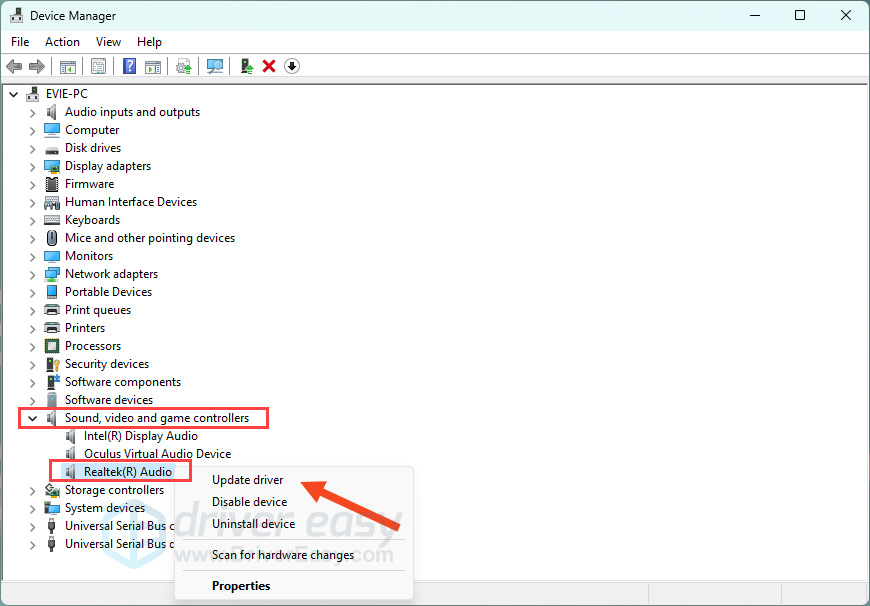
- Follow any on-screen instructions. When finished, restart your computer to apply the changes.
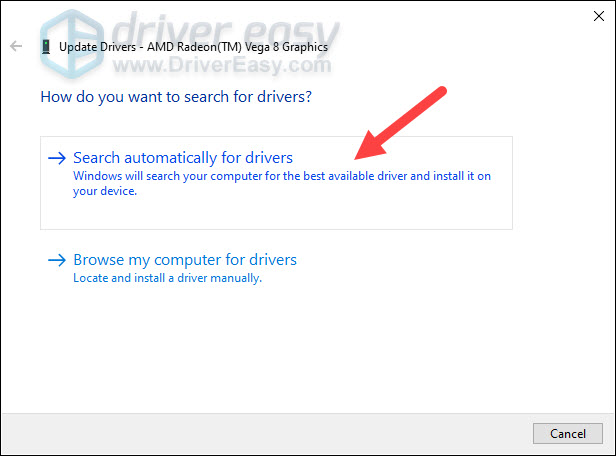
Method 2: Download and install the Realtek audio driver from your device manufacturer
For the most compatible driver, it’s best to visit your PC or motherboard manufacturer’s support website (e.g., Dell, HP, ASUS, Lenovo, MSI). Below we’ll detail the steps to download and install the latest audio driver for your Dell, HP, and Lenovo devices. It’s important to note that your screen might look slightly differrent when you search for drivers, but the steps you take should remain consistent.
First, you’ll need to identify your system model. Follow the steps below:
- On your keyboard, press the Windows logo key + R to open the Run box. Type msinfo32 and hit Enter. This will open the System Information window.
- From there, locate System Model. You’ll need this information later.

Dell
- Go to Dell Drivers & Downloads page. Input your model (e.g. Inspiron 3910) into the search field and hit Enter.
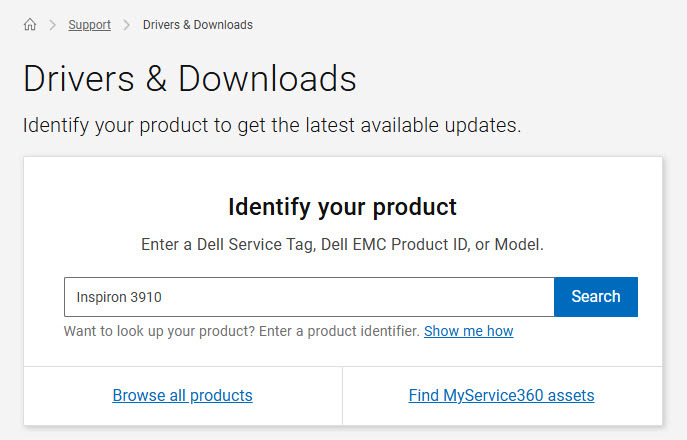
- Click Select Drivers.
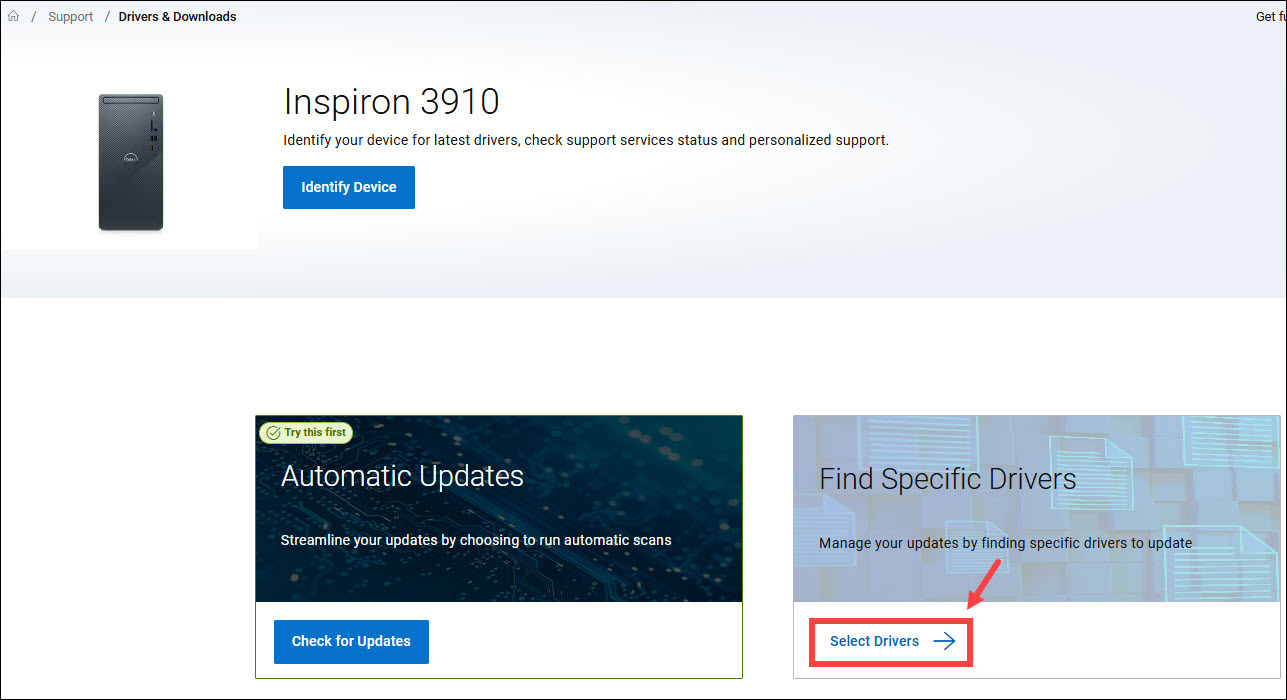
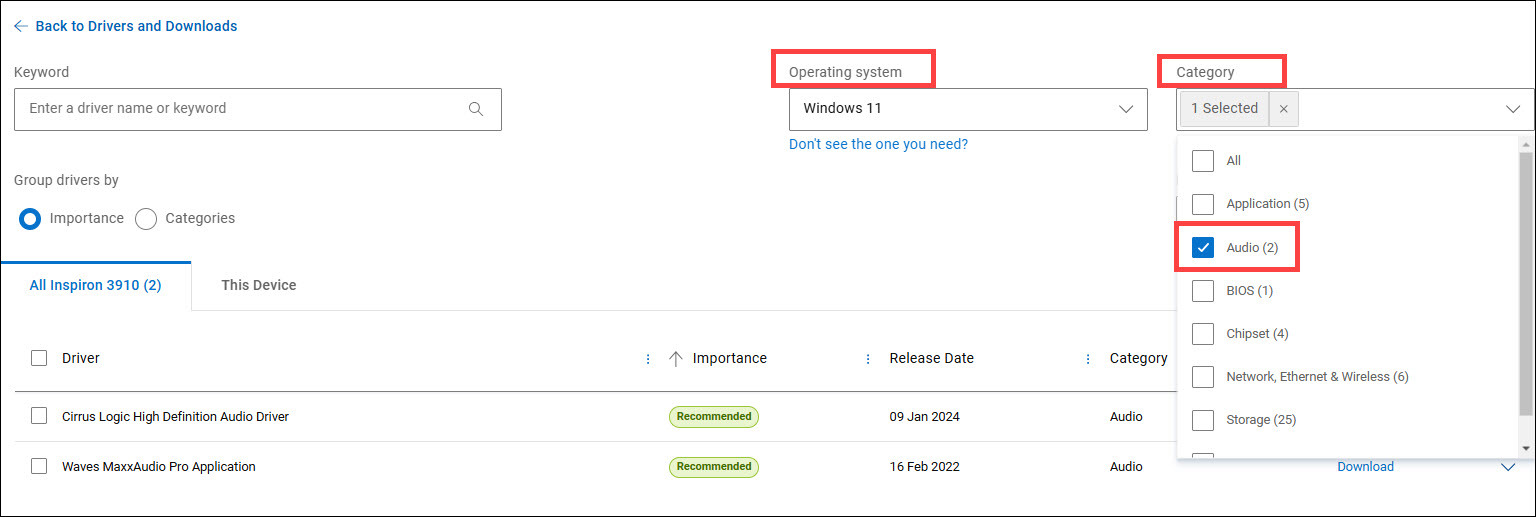
- Select the operating system from the drop-down menu, and select Audio as the Category, or you can simply enter the specific driver name into the search field. Then you should be able to see available audio drivers. Then download the one you need.
HP
- Go to HP Support page.
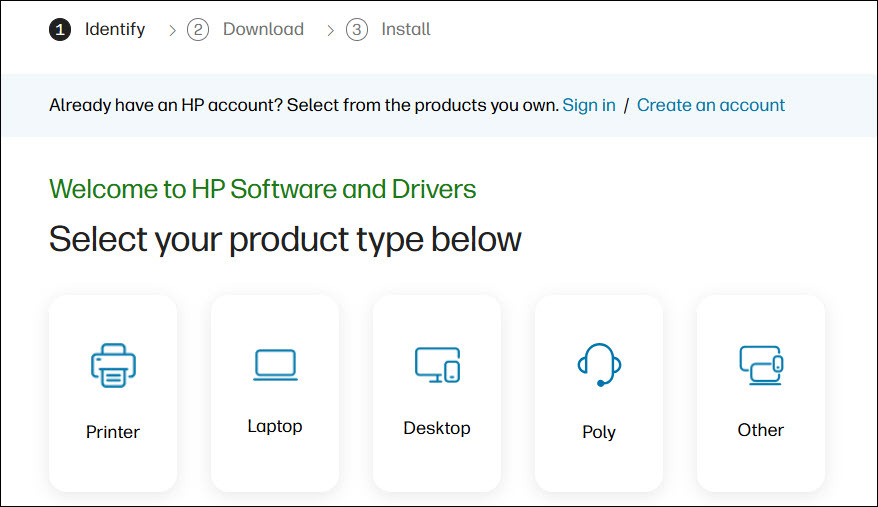
- Select your device.
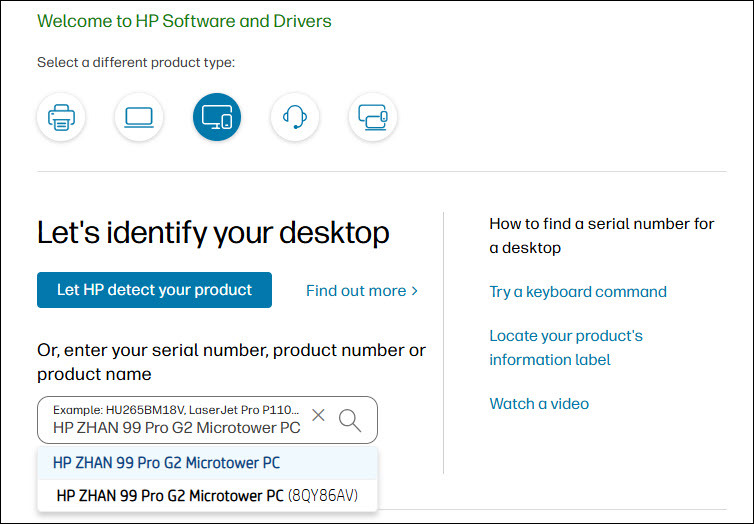
- Input your model into the search field (e.g. HP ZHAN 99 Pro G2 Microtower PC) and select it when it appears on the search results.
- Selec the operating system and version you have from the drop-down menu.
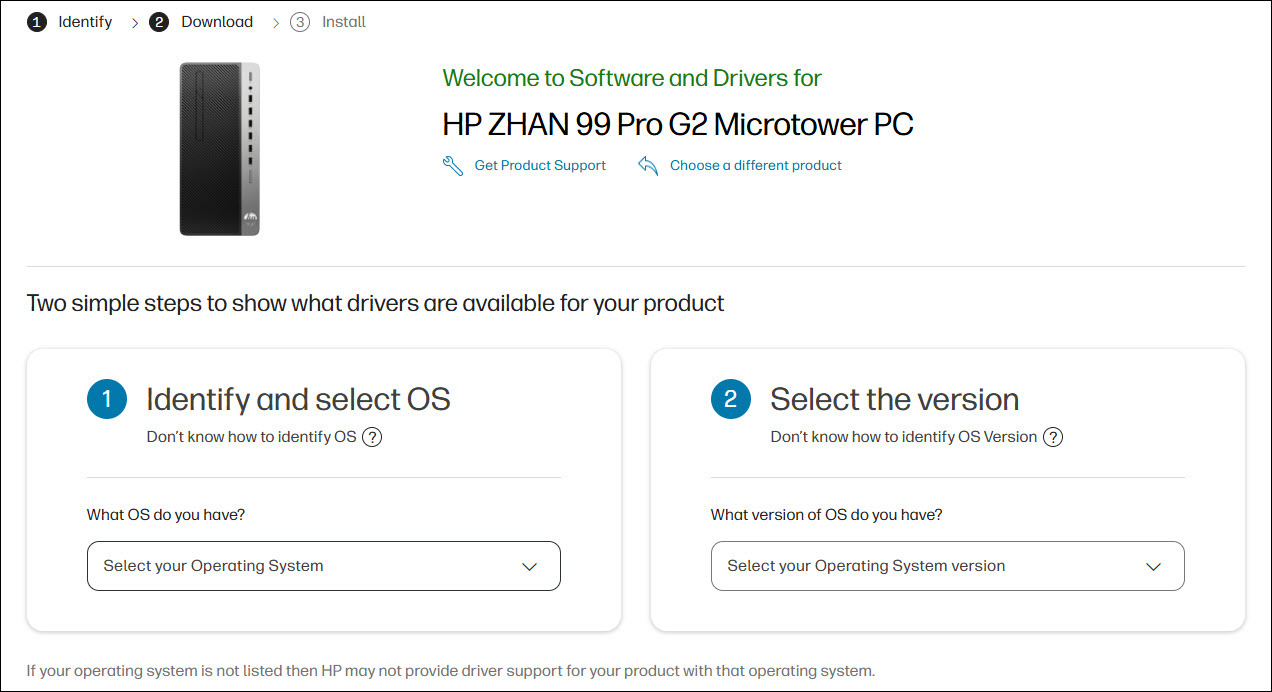
If you have no idea of the operating system you have, simply open the Run box by pressing the Windows logo key + R, then paste winver, and hit Enter to view it.
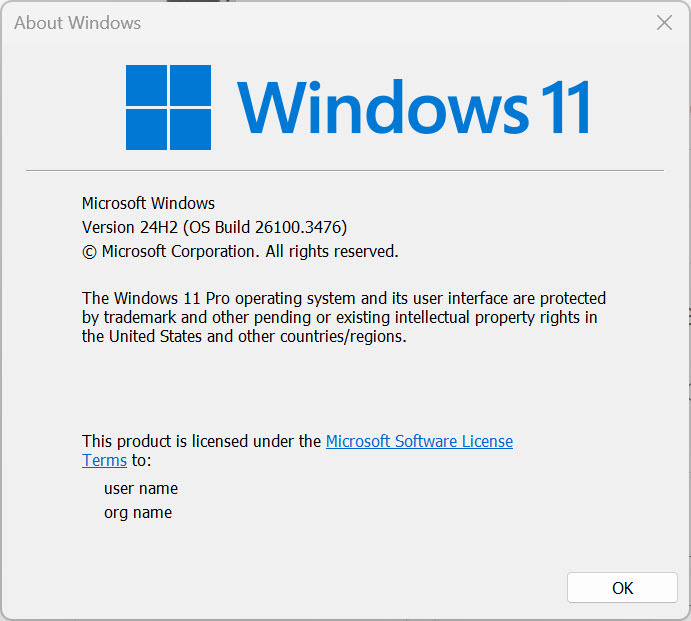
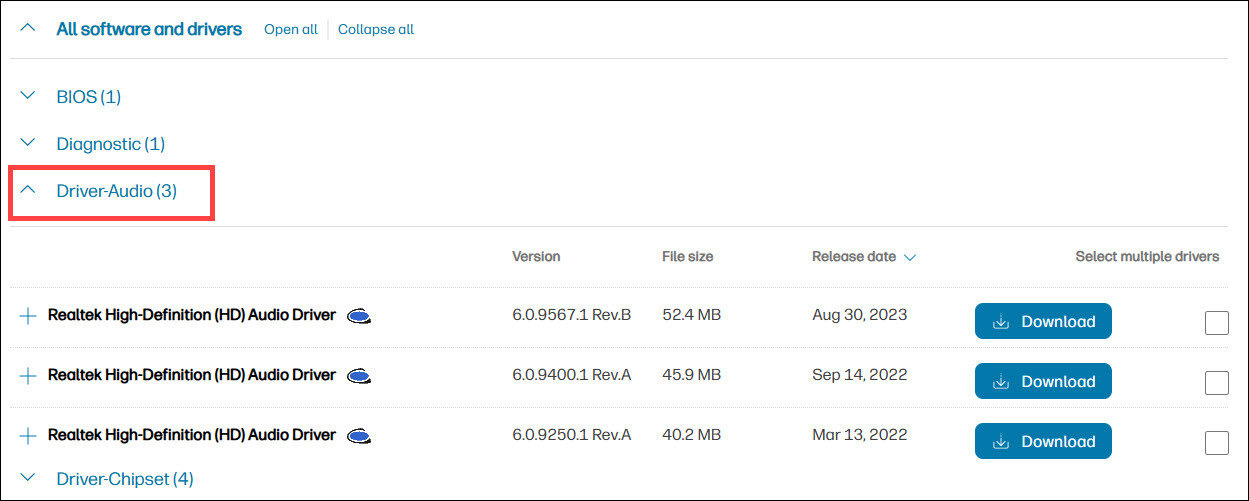
- Expand the Driver-Audio category, find the driver you need and download it.
Lenovo
- Go to the Support page.
- Enter the model (e.g. 90MV000WCD) into the search field and hit Enter.
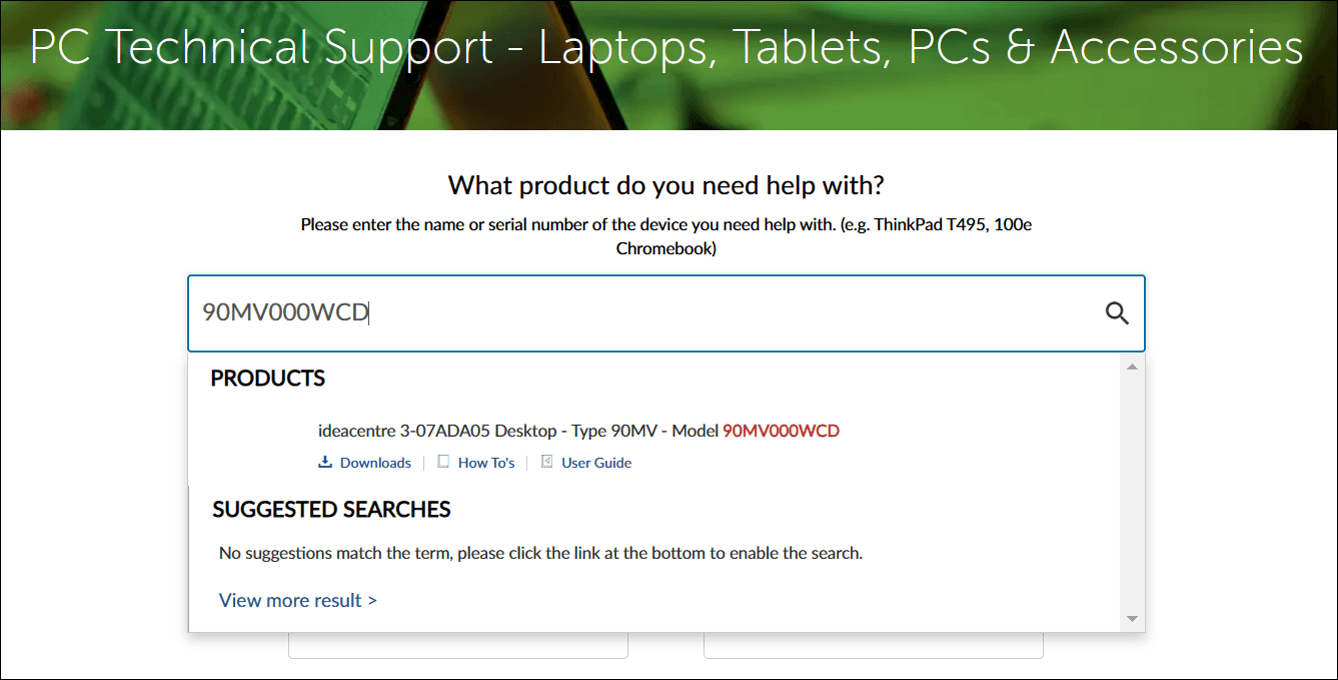
- Click Drivers & Software.
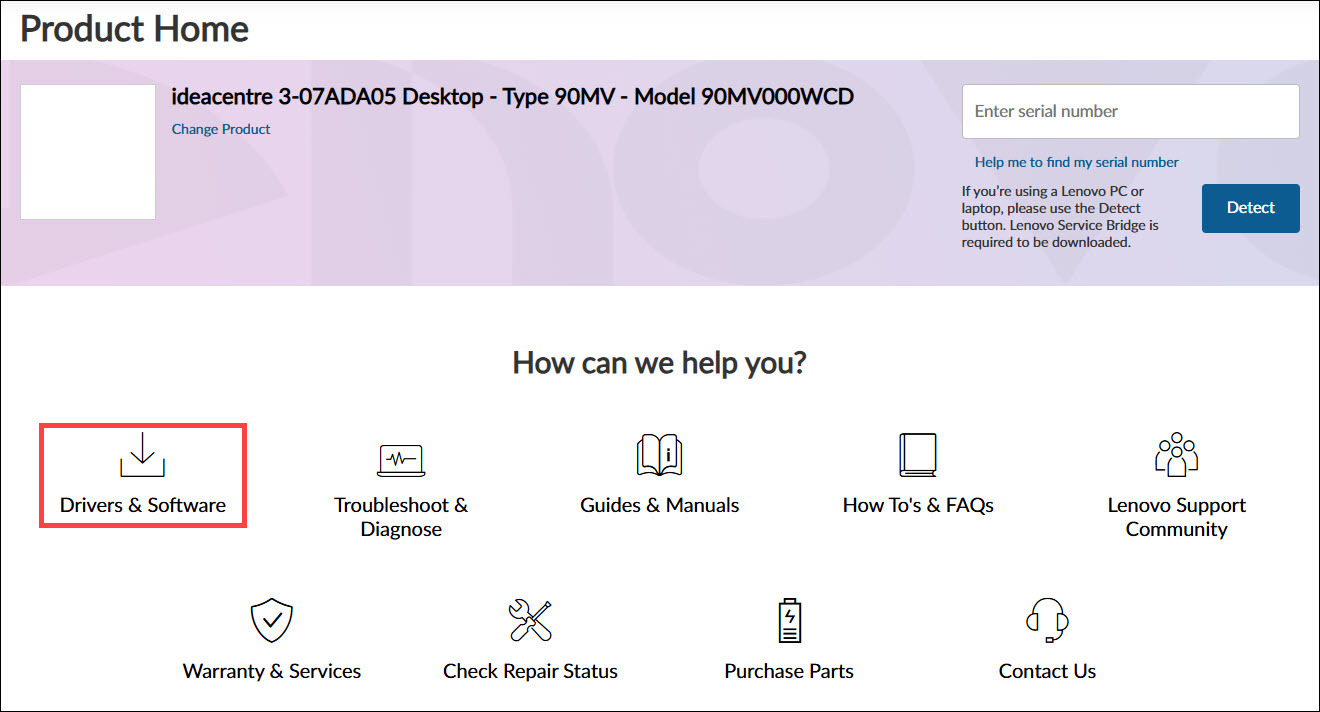
- Click Select Drivers.
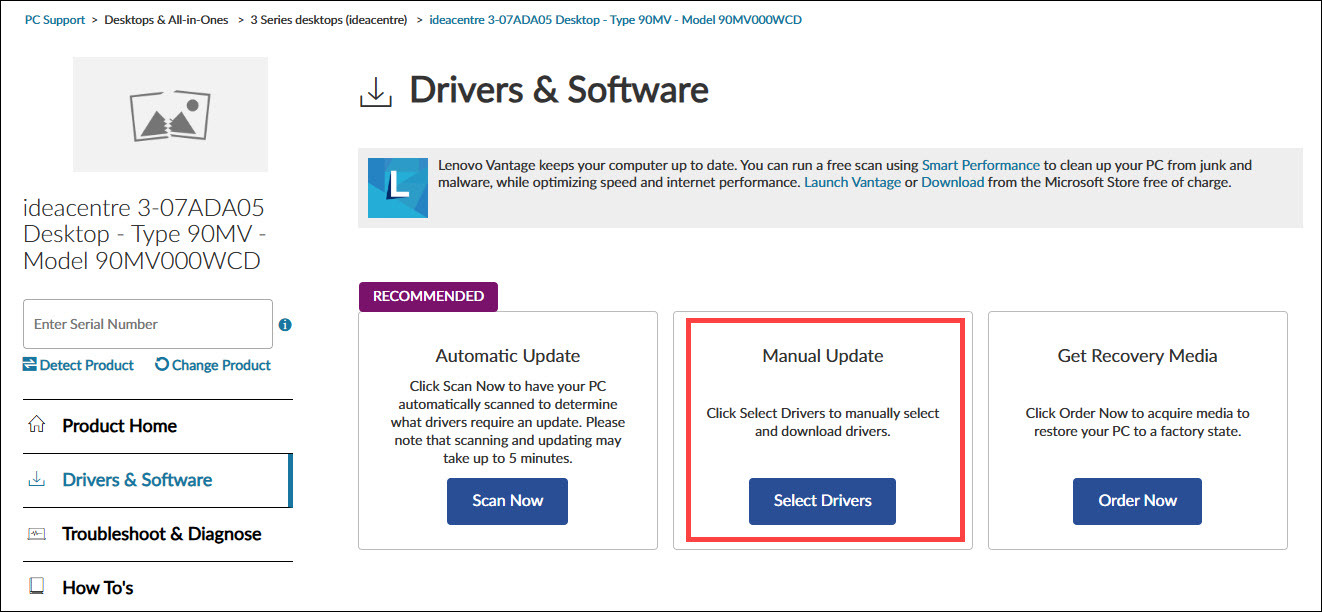
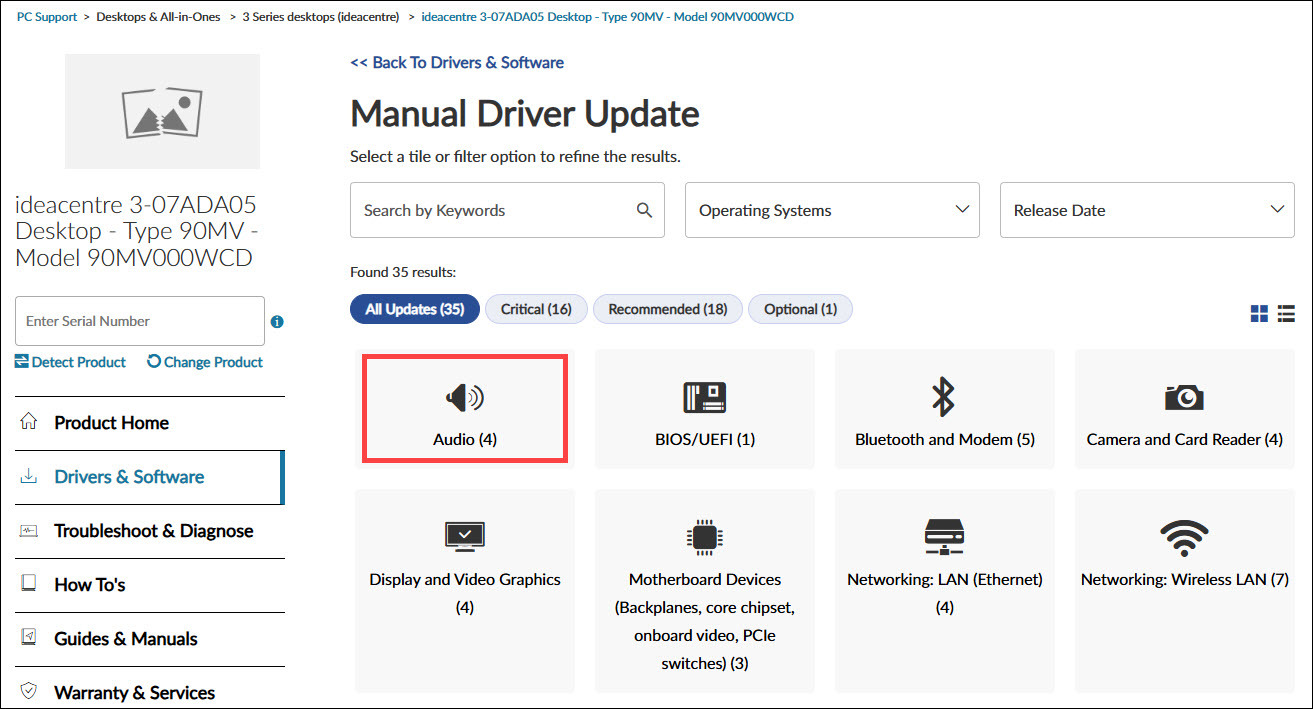
- Select Audio.
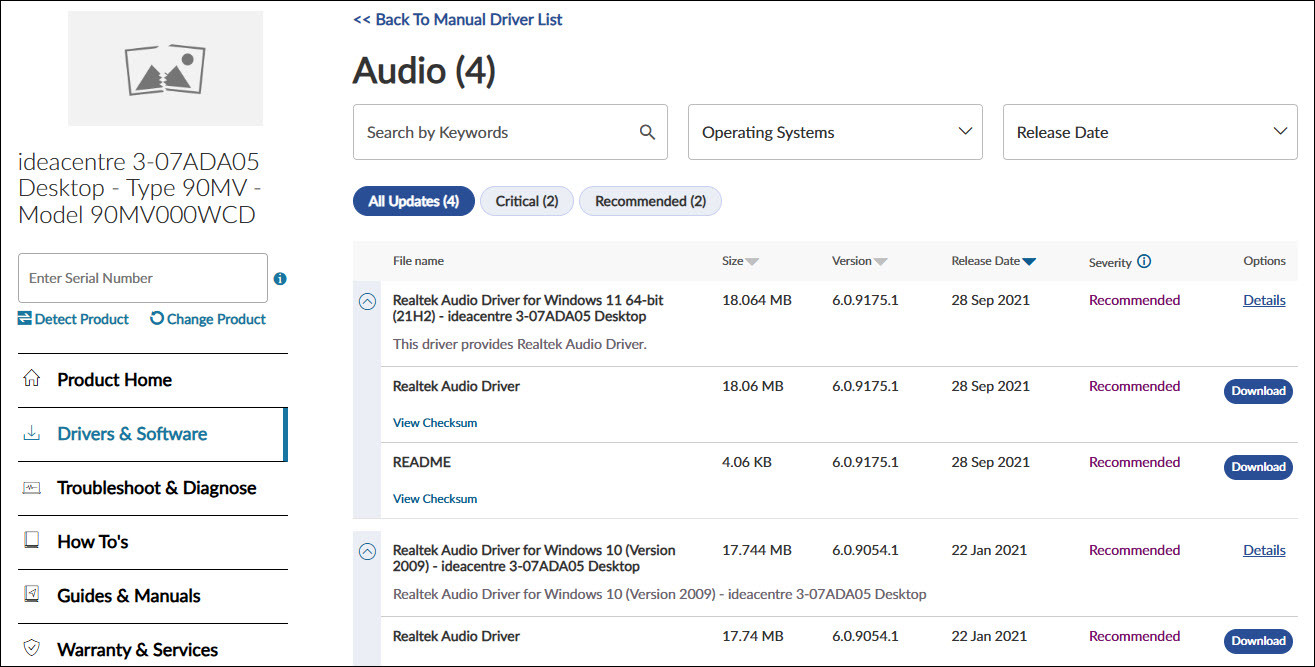
- Select your operating system, find the audio driver you’re looking for and follow the on-screen instructions to download and install it.
Method 3: Update the Realtek audio driver automatically
If manually searching for driver updates is time-consuming, you can try Driver Easy.
Driver Easy scans your computer to detect outdated or missing drivers. It simplifies the update process by eliminating the need to identify your operating system or search for the correct drivers. While Driver Easy is a paid software, it offers a 7-day free trial, allowing you to evaluate its features before committing.
Driver Easy simplifies the process of updating all your drivers safely and automatically with just a few mouse clicks. Here’s how you can do it:
1) Download and install Driver Easy.
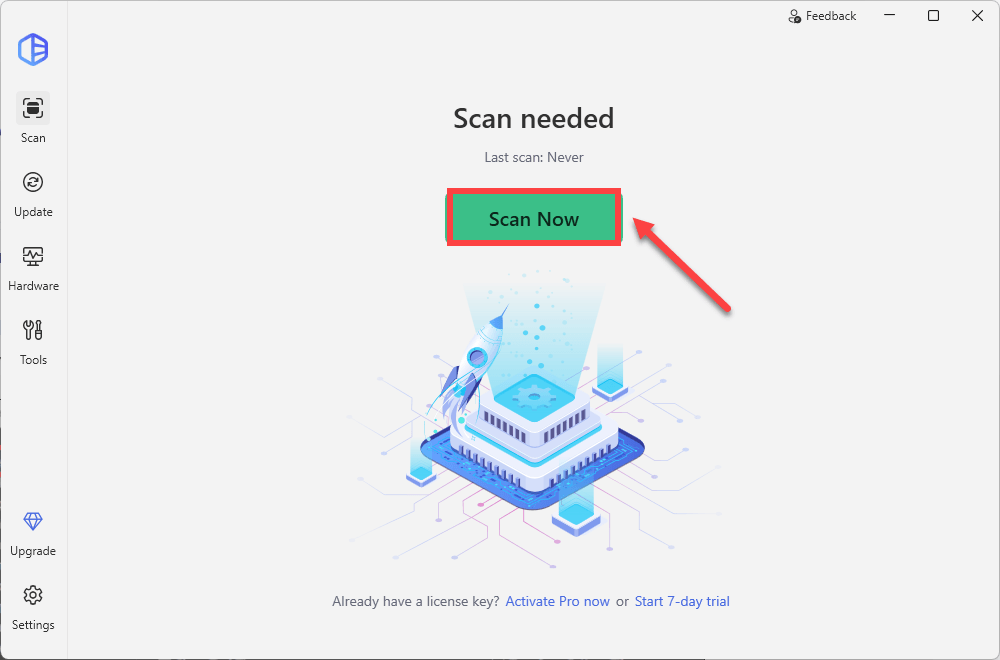
2) Click the Scan Now button. Driver Easy will detect all problem drivers instantly.
3) Click the Update All button to download and install all drivers automatically, direct from the manufacturer. (This requires the Pro version. You’ll be prompted to upgrade when you click Update All. You can opt for the free trial to try all Pro features in 7 days, or you can go Pro now with a discount on us.)
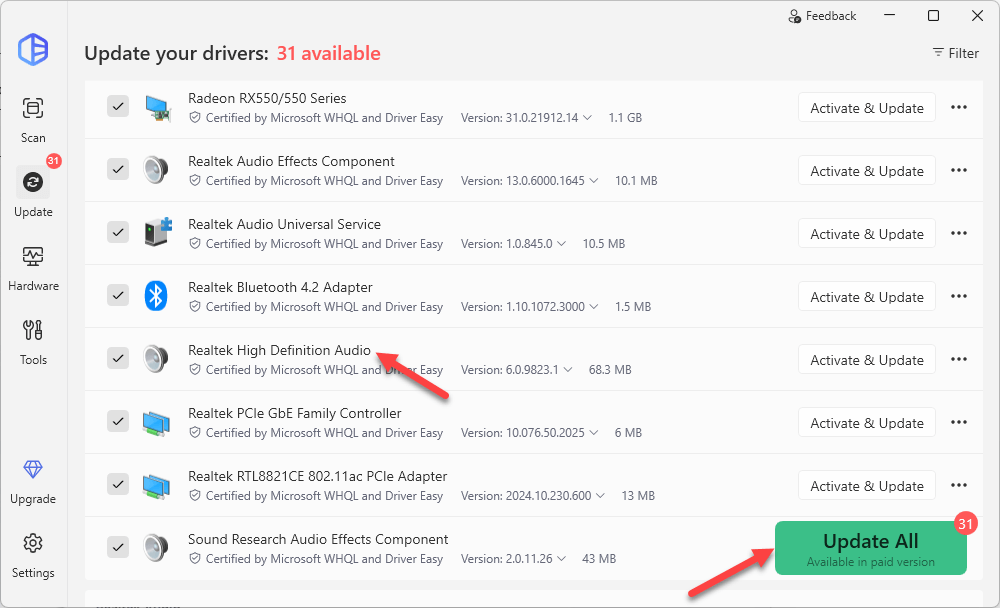
If you need assistance, please contact Driver Easy’s support team at support@drivereasy.com.
Hopefully, you find the tips helpful to update the Realtek audio drivers easily. If you have any questions, please leave your comments below. I’d love to hear of any ideas or suggestions.
337
337 people found this helpful
Available in other languages
Votre problème de périphérique audio est fort probablement lié à votre pilote audio. Suivez notre texte et téléchargez rapidement le correct pilote audio.
Sammi is a dedicated content writer at Driver Easy. And her mission is simple: She’s here to help you solve your issues and make your digital life smoother.
Her journey into providing troubleshooting guides started when she graduated from university, and ever since, she’s been fueled by a deep passion for assisting users. There’s nothing more satisfying to her than helping individuals overcome their tech challenges and providing solutions that work.
To ensure she’s always well-equipped to assist you, she keeps her finger on the pulse of the tech world. She’s an avid reader of tech news from websites like The Verge, PCMag, and Wired, and she’s a devoted follower of tech YouTube channels. This dedication to staying informed allows her to provide you with up-to-date insights, step-by-step guides, and solutions that truly make a difference.
So if you’re facing game launch issues, or encountering errors, she’s here to support you every step of the way.
Безопасное обновление
Для обеспечения безопасности обновления драйверов пользователей мы строго контролируем каждый этап процесса обновления драйверов: от сбора, тестирования драйверов, до обновления, резервного копирования и удаления драйверов. И постоянно отслеживаем каждый драйвер в базе данных, вовремя находим и устраняем проблемы с драйверами.
Скачать драйвер сейчас
Популярные драйверы звуковой карты +
Обновление в один клик
Возможность обновления в один клик, предоставляемая Driver Booster, позволяет пользователям загружать, устанавливать и обновлять несколько драйверов с истекшим сроком действия одним щелчком мыши. А режим автоматического обновления системы в свободное время позволяет избежать длительного ожидания завершения обновления, что значительно экономит ваше время, поэтому вы можете сосредоточиться на важных делах.
Скачать драйвер сейчас
Популярные драйверы звуковой карты +
Устранение неполадок устройства
Driver Booster также предоставляет набор полезных инструментов для обнаружения и исправления различных проблем устройств на вашем ПК, таких как исправление проблем со звуком, исправление проблем с сетью, удаление данных с неподключенных устройств и т.д., чтобы дополнительно обеспечить нормальную работу компьютерного оборудования пользователя.
Скачать драйвер сейчас
Популярные драйверы звуковой карты +
Ускорение игр
Обновление драйверов устройств помогает поддерживать и повышать производительность компьютера. Driver Booster предоставляет обновления для игровых драйверов Game Ready и игровых компонентов. Обновление таких драйверов может значительно повысить производительность игр. Кроме того, программа также предоставляет специальный модуль ускорения игр, который может останавливать незанятые компьютерные программы и службы, высвобождать больше системных ресурсов, увеличивать скорость загрузки игр и уменьшать задержки.
Скачать драйвер сейчас
Популярные драйверы звуковой карты +