
Msg 3702, Level 16, State 3, Line 2
Cannot drop database “DataBaseName” because it is currently in use.
This is a very generic error when DROP Database is command is executed and the database is not dropped. The common mistake user is kept the connection open with this database and trying to drop the database.
The following commands will raise above error:
USE AdventureWorks;
GO
DROP DATABASE AdventureWorks;
GO
Fix/Workaround/Solution:
The following commands will not raise an error and successfully drop the database:
USE Master;
GO
DROP DATABASE AdventureWorks;
GO
If you want to drop the database use master database first and then drop the database.
Reference : Pinal Dave (https://blog.sqlauthority.com)
Related Posts
How to fix the SQL Server error Cannot drop the database because it is currently in use?
Also know as the 3702 error, the SQL Server error Cannot drop the database because it is currently in use is frequent in multi-user environments. It is possible to manage SQL databases with scripts or via the various windows of SQL Server Management Studio. For example, you can simply delete a database with a SQL DROP statement. However, if there are active connections on the database being deleted, then the database returns an error message, because a database with an active connection cannot be deleted.
1. Scripts that generates the drop database error
The exact error message text is the following:
Cannot drop database because it is currently in use. (Microsoft SQL Server, Error: 3702).
Note: Be careful to check the database backups before deleting it completely. Especially in important projects and production environments.
For example, this type of script generates the error:
USE [master];
GO

DROP DATABASE [DB1];
GO
Another way to create the database is to check if the DB exist on the server, before running the Drop Database command, like this for example:
USE [master];
GO

IF EXISTS (
	SELECT name
	FROM master.dbo.sysdatabases
	WHERE name = 'DB1'
)
DROP DATABASE [DB1];
GO
To avoid this error, close all active connections to the database before the drop and terminate the current queries. Then close the tabs in SSMS or explicitly end the open connections on the database. Finally close the active tabs if only one user is currently connected. For the second step, run these two operations :
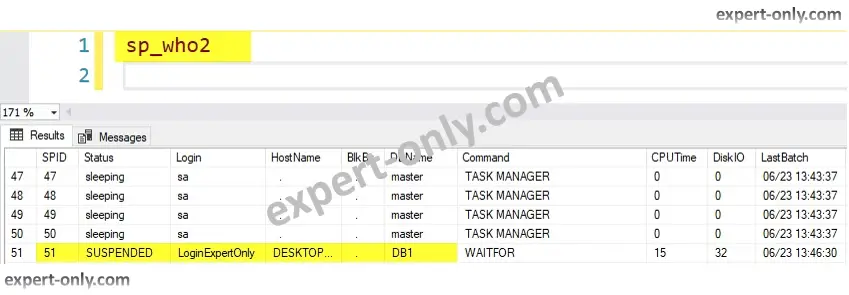
2. Execute sp_who2 procedure to identify IDs of active sessions
In the screenshot we identify the active sessions for the DB1 database. We see one user with SPID 51.
sp_who2
Check out this other article about how to create a database with default options with the SSMS graphic user interface.
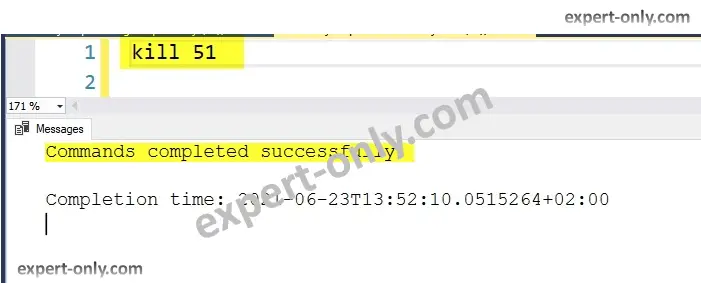
3. Close sessions with the SQL Server kill command and SPID
It is the active SPID that prevent the drop from being successful. Indeed, the Microsoft RDBMS do not allow to drop a database with active sessions. Indeed, you need to terminate all the sessions with the SPIDs found. To do this, use the Server Process ID (SPID) found in the previous query to kill the session. Execute the query in SSMS.
kill 51
4. Execute again the drop database script without error
Repeat the operation till no active connections are visible on the list. To go further, here is the official documentation of the T-SQL kill command. The “unable to drop the database because it is currently in use” sql command error is a classical one. Indeed it’s an object that allows many connections from different users at the same time.
Conclusion on SQL Server error 3702
This MS SQL tutorial explains how to avoid the common SQL Server error message : Cannot drop the database because it is currently in use. It is a common error and the tip is very useful when creating and deleting multiple databases in development and testing environments for example.
How to completely drop a SQL Server database ?
A database, unlike a table, cannot be erased or dumped. A database must be dropped, i.e., completely deleted to remove all its contents. Use the DROP DATABASE command to delete a SQL Server database.
SQL Server administration tutorials
To go further and learn more on MS databases management, check out this tutorials on the SQL Server DBA topic.
- Empty the SQL Server transaction log and fix error 9002
- How to install a second SQL Server instance on a server?
- How to display the SQL Server detailed version with a query?
SQL Server Can’t Drop Database in Use – Fix Error 3702
Approved By
Anuraag Singh
Modified On
November 18th, 2024

Synopsis: In this article, we’re going to fix the SQL Server Can’t Drop Database in Use error. This 3702 error is quite common for SQL users and is not that tough to fix. However, new users who are not proficient in SQL technicalities might still face some issues. Therefore, this article is going to explain the best ways for users to fix this error.
Moreover, users will learn the causes of this error, several important tips & the combined knowledge that the users require for the same. Let’s quickly understand the entire error first, so that we can move ahead to its subsequent topics.
Table of Content
- Error 3702 : Explanation
- Why SQL Server Can’t Drop Database in Use?
- Important Tip for SQL Users
- Easy Fix Method with Command
- SP_WHO2 & KILL CMD Method
- Conclusion
This cannot drop DB because it is currently in use error occurs in the database, whenever a user tries to drop their database. However, it’s not as simple as it looks like. This error only occurs when users are having an active connection with a database. Putting it simply, when a user with an active database connection, tries to drop that database, faces error 3702.
It’s mostly observed in the multi-user environments of SQL Server databases. Although users have SSMS & T-SQL commands to do so, this task can still be hampered by small mistakes like the one stated above. Therefore, we have two solutions for this. Both are mentioned below.
Before we jump on to the solutions, users must back up their SQL database. This way, it’ll be easier for them to just safely DROP the database.
Cannot Drop Database Because It Is Currently in Use – All Error Reasons
There are a few reasons why users face this error while executing the MSSQL drop database task or any other. If users can understand these causes from their roots, solving the entire problem will be as easy as fixing LEGO blocks. Thus, below we have mentioned the most common causes:
Active Connections in the Database: Now, we have the most common cause here which is to attempt a database drop operation with an active transaction going on. Any active transaction, stored procedure, or even users with connected instances might create this problem.
Sudden Query Termination: Abrupt system shutdowns during any ongoing execution of a query often end with severe data abnormalities. Moreover, various SQL errors can originate because of this like the 3702 error in the SQL server & many more.
Corruption Issues In DB: Database files when catching corruption, are useless. It’s just like iron with rust. We can easily fix this corruption only if we have the right tool for it (mentioned in further sections).

Important Tip – SQL Error 3702
Apart from the mentioned reasons, there are times, when users’ database is corrupted. Evidently, this causes several technical errors. In order to get rid of such corruption issues, users can try the SQL Database Recovery Tool to fix the issue. This software can easily repair the damaged MDF files without any errors.
Easy Fix for SQL Server Cannot Drop Database Error
Most of the time users execute the below command:
USE Database_Test;
GO
DROP DATABASE Database_Test;
GO
However, if the connection is active, users will face the error 3702: Cannot drop the database because it is currently in use issue. Therefore they should run the below-mentioned command:
USE Master;
GO
DROP DATABASE Database_Test;
GO
In case, users still face this error even after executing this then they have to go through the detailed solution we are going to discuss next.
Fix Cannot Drop the Database Because It Is Currently in Use (Detailed)
Run Execute sp_who2 Procedure
Now, users need to run the sp_who2 Procedure in order to identify the active sessions in the database.

Close Active Sessions with KILL Command & SPID
Now, that users have the active SPID, they just need to use the KILL command for that active id.
Again run the T-SQL DROP database command mentioned above. This time, users will most likely get the desired solution & solve this cannot drop database because it is currently in use issue.
Bringing It All Together
Finally. Users are aware of the right method to get the perfect solution here. However, they must make sure that they have a backup of the database in case anything goes wrong. Both the solutions mentioned above can easily fix the SQL Server can’t drop database in use 3702 error. However, the automated tool is way better as it can fix nonclustered index in SQL Server, damaged MDF file, etc. Rest, if users do have any more queries related to this cannot drop DB because it is currently in use error, they can email us.
Hi This post describes how to delete a user-defined database in SQL Server
Management Studio in SQL Server by using SQL Server Management
Studio or Transact-SQL.
Using SQL Server Management Studio
To delete a database
- In Object Explorer, connect to an instance of the SQL Server Database Engine, and then expand that instance.
- Expand Databases, right-click the database to delete, and then click Delete.
- Confirm the correct database is selected, and then click OK.
Using Transact-SQL
To delete a database
- Connect to the Database Engine.
- From the Standard bar, click New Query.
-
Copy and paste the following example into the query window and click Execute. The example removes the Sales and NewSales databases.
USE master ;
GO
DROP DATABASE Sales, NewSales ;
GO
If you are Receive Below Error Message
Msg 3702, Level 16, State 3, Line 2
Cannot drop database “DataBaseName” because it is currently in use.
Fix/Workaround/Solution:
Close SQL Server Management Studio completely. Open it again and connect
as normal. Now you will be able to drop the database with
Conclusion
If you want to drop the database use master database first and then drop the database.
Thanks
R.karthikeyan
As SQL Server users, we often come across various error messages that can be quite frustrating to deal with. One such error is Error 3702, which occurs when we try to drop a database that is currently in use. In this article, we will explore this error in detail and discuss two approaches to resolve it.
The Error Message
The error message, “Msg 3702, Level 16, State 3, Line 1 Cannot drop database ‘DemoDB’ because it is currently in use,” clearly indicates that the database cannot be dropped due to active connections.
Before attempting to drop the database, it is important to ensure that our own connection is not using it. To do this, we can change the context to the master database using the following command:
USE MASTER
GO
Once we have changed the context, we can proceed with dropping the database:
DROP DATABASE DemoDB
GO
If we still encounter the same error, there are two approaches we can take to resolve it.
Approach 1: Long Approach
The long approach involves identifying the connections that are blocking the database from being dropped. We need to find the sessions that are currently using the database and kill those sessions. Here is a script that generates the kill command:
SELECT 'kill ' + CONVERT(VARCHAR(100), session_id)
FROM sys.dm_exec_sessions
WHERE database_id = DB_ID('DemoDB')
AND session_id <> @@spid
Running this script will provide us with a list of kill commands. We can execute these commands to terminate the sessions and then attempt to drop the database again. If the database is successfully dropped, we can proceed; otherwise, we may need to repeat the process.
Approach 2: Short Approach
SQL Server provides an inbuilt functionality to forcefully terminate all connections to a database. This can be achieved using the “WITH ROLLBACK IMMEDIATE” clause. Here is an example:
USE [master]
GO
ALTER DATABASE [DemoDB] SET SINGLE_USER WITH ROLLBACK IMMEDIATE
GO
USE [master]
GO
DROP DATABASE [DemoDB]
GO
By setting the database to single-user mode with the “WITH ROLLBACK IMMEDIATE” clause, all other connections will be terminated, and their work will be rolled back. We can then proceed to drop the database without any issues.
If you are interested in learning about other rollback options available with the ALTER DATABASE statement, you can refer to my earlier blog post on the topic: “SQL SERVER – Difference Between ROLLBACK IMMEDIATE and WITH NO_WAIT during ALTER DATABASE.”
We hope this article has provided you with a better understanding of Error 3702 in SQL Server and the approaches to resolve it. By implementing these techniques, you can effectively handle this error and avoid any unnecessary roadblocks in your SQL Server operations.